
 e.Soft Technologies - Software Development Companye.Soft Technologies - Software Development Company


If you have asked three ERPNext vendors how long implementation takes and received three different answers, you are not alone. You will hear anything from four weeks to six months, and depending on your business, both could be true.
The honest answer is: it depends, but not in a vague way. There are specific, concrete factors that determine your go live date, and most of them are within your control, not your vendor’s.
This article gives you a realistic ERPNext implementation timeline for Indian businesses, what each phase involves, and what your team needs to do to stay on schedule.
Want a timeline specific to your business? Book a free 30 minute call with our certified ERPNext consultant. We will give you a realistic week by week plan based on your modules and data.
Book a Free Demo
For a small to mid-sized Indian business, typically 5 to 50 users implementing accounting, inventory, and sales modules, the realistic go live timeline is 45 to 60 days.
Here is how the timeline varies by business size and complexity:
| Business type | Realistic go live timeline |
| Small business, 5 to 15 users, core modules only | 4 to 6 weeks |
| Growing SME, 15 to 50 users, core modules plus Tally migration | 6 to 8 weeks |
| Manufacturing company, core plus BOM and work orders plus HRMS | 8 to 12 weeks |
| Multi location business, 50 or more users, custom workflows | 12 to 16 weeks |
One thing worth understanding early: the software installs in hours, not weeks. Every week in the timeline above is spent on configuration, data preparation, testing, and training. That means the timeline is largely driven by how prepared your business is, not by your vendor’s technical speed.
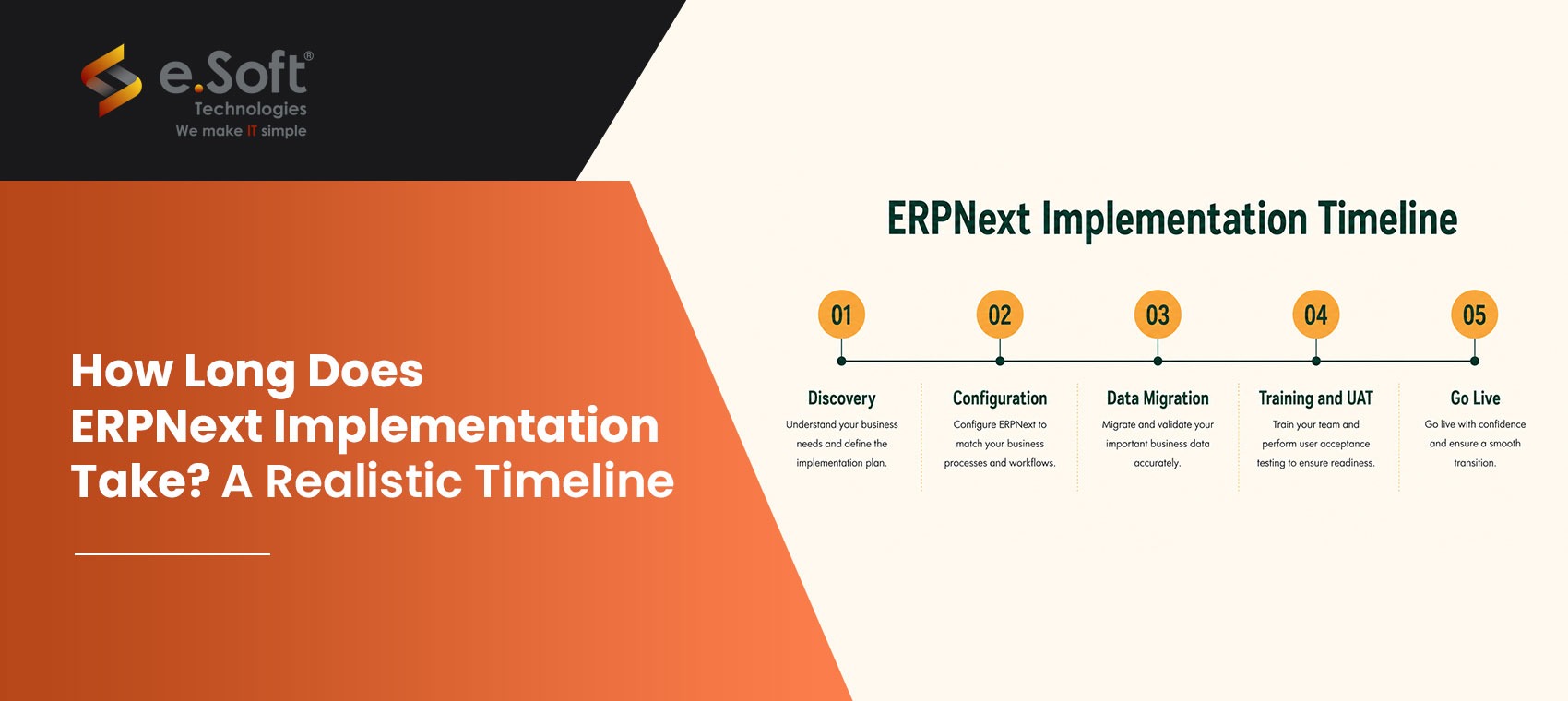
Before any configuration begins, your implementation partner needs to understand how your business actually operates. This involves mapping your purchase to the payment process, your order to delivery flow, your chart of accounts structure, and your GST configuration.
Workshops with your operations, finance, and IT stakeholders typically take four to six hours total. What slows this phase down most often is when there is no clear internal point of contact, or when key decision makers are unavailable for sessions.
Once discovery is documented, your consultant configures ERPNext to match your business: tax templates, inventory valuation, warehouse structure, user roles, approval workflows, and print formats for invoices and purchase orders.
For Indian businesses, GST e invoicing, TDS configuration, and HSN code mapping are set up during this phase, not added later as an afterthought. Scope changes after this phase begins are the most common reason projects run over budget and timeline.
For most Indian businesses, this means migrating from Tally, Excel, or both. The condition of your existing data is the single biggest variable in the entire project. Clean, reconciled Tally data migrates in days. Inconsistent records spread across multiple Excel sheets maintained by different people over several years can add two to four weeks to your timeline.
This phase also includes GST validation before going live: every GST number, HSN code, and tax template is checked against your existing records before cutover.
User acceptance testing is where your team confirms everything is configured correctly before going live. Your finance manager raises a test purchase order. Your warehouse staff records a stock entry. Your accountant runs a GSTR report. Every module is tested by the person who will actually use it.
Training runs in parallel, structured by role. Accounts teams are trained on finance and GST. Warehouse teams on inventory and procurement. Generalist training where everyone attends every session is a reliable way to ensure nobody actually learns the system.
A good go live is supervised, not handed over remotely. Your implementation partner should be reachable on go live day, not just via a support portal. The first two weeks of live operation are where edge cases surface that never appeared during testing.
At e.Soft, every implementation includes 90 days of post go live support. This is what separates a technically complete implementation from one your team actually uses confidently.
Most overruns are caused by the same handful of issues, regardless of vendor or industry:
The businesses that go live on schedule are not the ones with the simplest operations. They are the ones that arrive prepared. Here is what you can do before approaching any vendor:
Audit your Tally or Excel data: Export your ledgers, check for duplicate suppliers, reconcile outstanding balances, and confirm item codes are consistent. Every hour you spend on this saves two hours in Phase 3.
Document your top five workflows: Map your current process for purchase to payment, sales order to delivery, and stock transfer on paper before your first vendor meeting. This compresses discovery time significantly.
Define your go live scope and stick to it: Know which modules you need on Day 1 versus which can wait until Month 3. A phased approach consistently produces faster, cleaner lives than trying to implement everything at once.
Assign an internal project champion: One person in your company needs to own this project with the authority to make decisions, get stakeholders into rooms, and sign off on testing.
Finalise your chart of accounts: Your accountant should review and confirm the account structure before implementation begins. Changing it mid project is expensive and time consuming.
Decide on hosting before Day 1: Cloud hosting via Frappe Cloud or AWS India Region, or on premise on your own server. Server provisioning mid project adds delays that have nothing to do with ERPNext itself.
Not sure which modules to go live with first? Our certified ERPNext consultant will map a realistic phased plan for your business at no charge.
An inexperienced partner does not just implement slowly. They implement incorrectly, which means rework, which adds weeks. The most common pattern: a generic IT company delivers a technical go live in six weeks, but the GST configuration is wrong, the manufacturing BOM does not match the actual production process, and the next three months are spent fixing issues that a proper implementation would have caught during testing.
When evaluating any ERPNext partner in India, ask:
Looking for a transparent, fixed price ERPNext implementation in Mumbai? Visit our ERPNext services page to see our starter packs and included scope, or read our ERPNext implementation cost guide for a full breakdown of what implementations actually cost in India in 2026.
Ready to get started? Book a free 30 minute scoping call. We will review your current setup, define your module scope, and give you a week by week implementation plan with no obligation.
Book a Free Demo

For most Indian SMEs with 5 to 50 users implementing core modules, the realistic timeline is 45 to 60 days. Manufacturing setups with BOM and work orders take 8 to 12 weeks. Multi location deployments run 12 to 16 weeks.
For very small businesses with under 10 users, one or two standard modules, and no historical data migration, a 30 day go live is achievable. For most Indian businesses with existing Tally data and teams of 15 or more people, 45 to 60 days is the realistic minimum for a quality implementation.
The most common causes are scope changes after configuration has started, poor quality of existing Tally or Excel data, key team members unavailable for testing sessions, no clear internal project owner, and choosing a vendor without genuine ERPNext implementation experience.
Clean your Tally or Excel data before the project begins, document your top business workflows, define your go live module scope upfront and stick to it, assign one internal champion with decision making authority, and finalise your chart of accounts structure before Day 1.
Yes. At e.Soft Technologies, Tally and Excel data migration is included in every implementation package. We migrate your accounts, opening balances, supplier and customer masters, inventory items, and historical data, validated and reconciled before go live.
Yes. ERPNext includes built-in support for GST e invoicing, e way bills, GSTR 1, GSTR 3B, TDS, TCS, and payroll statutory compliance. At e.Soft, all GST configuration is set up and tested during implementation, not added afterward.
Are you seeking to contribute through your writing? Get in touch with us now!
Email Us!Warehouse Management Software
An eCommerce platform specializing in home improvement, home goods, and outdoor products, aims to serve as a comprehensive source for household essentials. Life and Home gained popularity, resulting in a substantial increase in orders from various platforms.

Life and Home partnered with e.Soft to develop warehouse management software. This innovative solution automated the entire workflow of their warehouse operations, particularly focusing on inventory management.
By streamlining processes and ensuring accurate inventory tracking, the software helped Life and Home fulfill orders promptly and minimize delays.
This collaboration underscored Life and Home’s commitment to leveraging technology to enhance operational efficiency and customer satisfaction in the competitive eCommerce landscape.
Software Development
Shia PG is one of the Premier institutions based in Lucknow. their vast education and management activities required sophisticated software for precision, punctuality, and accuracy. they needed this software to automate various activities of their education system. e.Soft supported them with manual processes with highly responsive and easy-to-use software.
To fulfil the client’s requirements, e.Soft designed and developed comprehensive software that automates end-to-end activities of the institution right from student admissions to generating iCards, all using its cloud-based system.
The software developed by e.Soft manages all the routine as well as complex activities with precision. It has simplified all the major detailed activities of the admission management system.
The administrative processes of the Shia P.G. College were enhanced with our automation software.
Joint Secretary Manager
Automated Cloud Security Compliance with Cloud RAXAK - RAXAK Protect
The National Payments Corporation of India (NPCI) is a leading organization in India, responsible for operating retail payments and settlement systems. Given the critical role NPCI plays in India’s financial infrastructure, maintaining a robust security posture across its cloud environments is vital for protecting sensitive data, ensuring regulatory compliance, and preventing unauthorized access.
Cloud Raxak has partnered with e.Soft since our founding in 2014. All our product development activities, and our web presence has been exclusively developed by the talented engineers at e.Soft.
Throughout our continuing engagement, e.Soft has been responsive to our changing skill-set needs ranging from Python development, front-end development, testing, and web management in a flexible and timely manner. We simply could not have developed a world-leading best-in-class security product, winner of the Gartner Cool Vendor award, and deployed at some of the most demanding financial sector companies without this support.
Thank you e.Soft!
CEO
Technical Support
ChannelSale equips online Sellers with cutting edge powerful software solutions and expert services for automating sync of product listings, inventory, orders across various eCommerce platforms globally via a single software interface. e.Soft offers technical support to their business.
With a wide range of technological solutions and a highly experienced team they delivered excellent technical support to our business. They met our demands by providing undivided attention and support and made sure our business was scaled up successfully.
CEO
Software Solutions
Infinity Group is a prominent leader in the automotive aftermarket products industry across West Africa. e.Soft provided Infinity Group with a tailored, all-in-one software solution designed to address their specific operational needs, like import and forex management, inventory management, complex operations, legacy systems, and more.
When Infinity Group was expanding its network of retail sales and service centers across Nigeria and Ghana, e.Soft stepped in with a much-needed robust system to manage its complex import, forex, and inventory operations.
e.Soft’s custom-developed software addressed these needsby automating processes, integrating critical business functions, and providing real-time data and analytics. This solution empowered Infinity Group to streamline their operations, reduce manual errors, and scale confidently across the region.
We’ve been working with e.Soft Technologies since September 2024, and it’s been a really smooth collaboration so far. Their team worked closely with ours and helped speed up both our app and website development. We’ve been able to launch features faster, improve stability, and give our users a better overall experience. They’re responsive, easy to work with, and quick to adapt whenever things shift. It’s been a positive experience, and we’re looking forward to continuing the partnership.
Co-Founder
